
158 AI Assistant
Chris McKeown / June 4, 2026
AI, Assistant
The BonusTools AI Assistant brings Claude AI directly into your Revit workflow. Ask questions about your model in plain English — elements, parameters, views, rooms — and get live answers without leaving Revit.
There are two ways to use it:
| Mode | Best for |
|---|---|
| Embedded Panel (inside Revit) | Quick queries while modelling — the chat panel lives in your Revit workspace |
| Claude Desktop Connector (MCP) | Power users who want to use Claude Desktop or Cursor as their AI interface, with Revit as a live data source |
Both modes use the same 50 Revit tools under the hood. You can run both at the same time.
Revit 2019 and newer. The AI Assistant requires an Anthropic API key.

Table of Contents
- Setup: Embedded Panel
- Setup: Claude Desktop Connector
- Setup: Cursor
- What it can do
- What it cannot do
- Tips
- Troubleshooting
Setup: Embedded Panel
1. Get an Anthropic API key
The AI Assistant uses Anthropic's Claude API. You need your own API key:
- Go to console.anthropic.com and sign in or create a free account.
- Navigate to API Keys and create a new key.
- Copy the key — you will only see it once.
Why do I need my own API key? Running a capable AI model costs real money per query. Rather than estimate your usage and bundle it into the BonusTools price, we pass the cost straight through. You pay Anthropic directly, only for what you actually use.
2. Enter the key in Settings
- In Revit, open Settings from the BonusTools ribbon.
- Go to the AI Assistant tab.
- Paste your API key into the key field and click Save Key.
- Select your preferred model from the Model dropdown.
- Click Save Settings.
The AI Assistant panel will unlock immediately. If the panel is not visible, click the AI Assistant button in the BonusTools ribbon to show it.
3. Choose a model
| Model | Speed | Cost | Best for |
|---|---|---|---|
| Opus 4.8 | Slower | Higher | Complex model analysis, multi-step reasoning |
| Sonnet 4.6 | Balanced | Moderate | Most users — good balance of speed and quality |
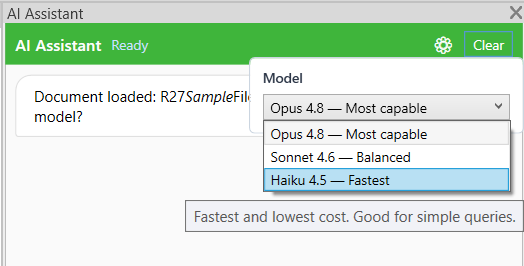
| Haiku 4.5 | Fastest | Lowest | Simple queries, quick lookups |
You can change the model at any time from Settings → AI Assistant tab.
Setup: Claude Desktop Connector
The Claude Desktop Connector lets you use Claude Desktop as your chat interface, with BonusTools acting as a live Revit data source. No need to switch back to the Revit window for queries — Claude Desktop stays in focus while Revit runs in the background.
How it works
Claude Desktop (your chat)
  │  MCP protocol (stdio)
  ▼
BonusToolsMcpServer.exe   ← installed alongside BonusTools
  │  named pipe
  ▼
Revit (running in background)
The connector ships as BonusToolsMcpServer.exe, installed automatically alongside BonusTools. Claude Desktop spawns it on demand and connects through to Revit via a local named pipe. Nothing leaves your machine except the normal Claude API traffic.
Prerequisites
- BonusTools installed (the
.exeis included from this release onward) - Claude Desktop installed (free or Pro)
- Revit open with a project loaded
Step 1 — Open BonusTools Settings
In Revit, open Settings from the BonusTools ribbon and go to the AI Assistant tab. Scroll to the MCP Server section.
You will see the MCP Server panel:
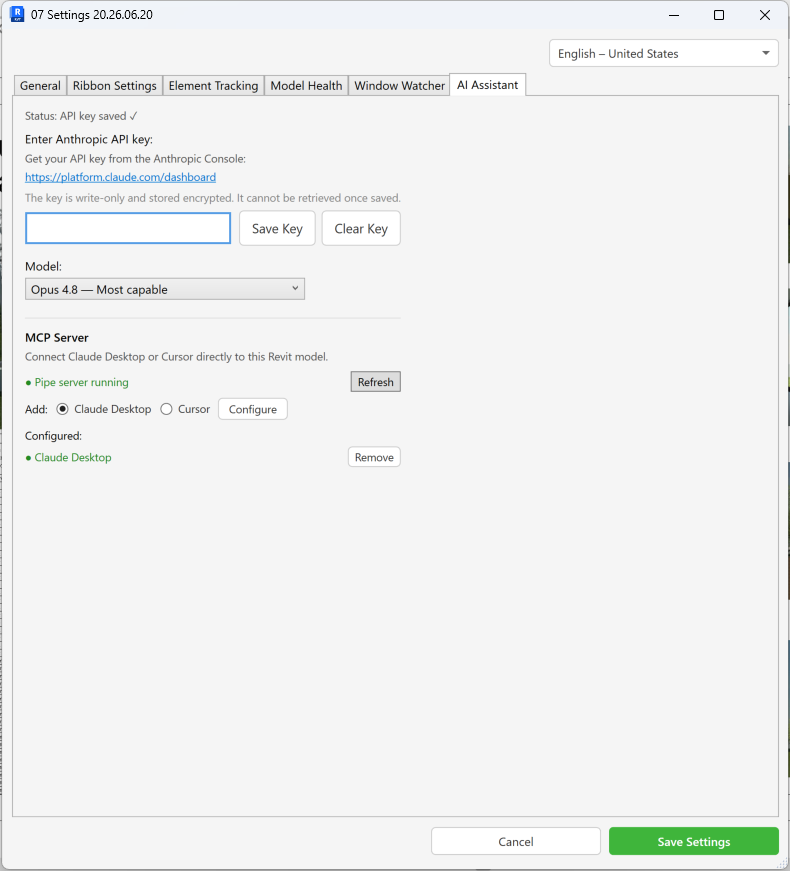
The panel shows:
- Pipe server status — confirms the background listener is running inside Revit
- AI client toggle — select Claude Desktop or Cursor
- Configure button — writes the entry to the selected client's config file
- Configured list — shows which clients are already set up, each with a Remove button
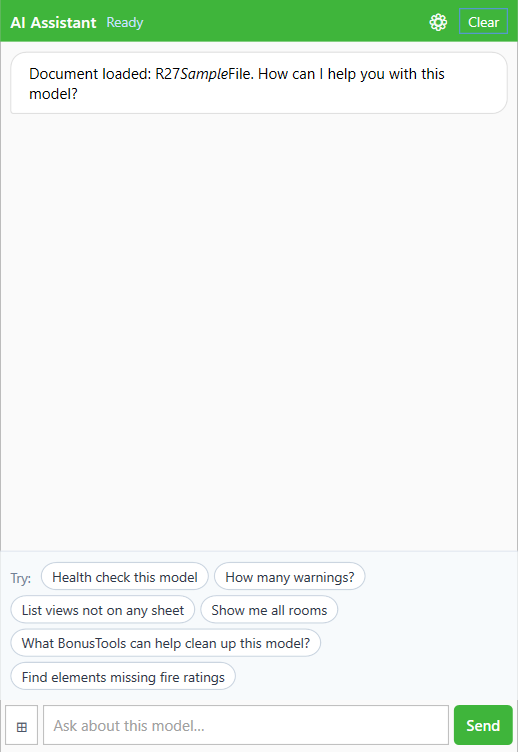
Now view the AI panel an interact with your revit model.
You can change between AI models
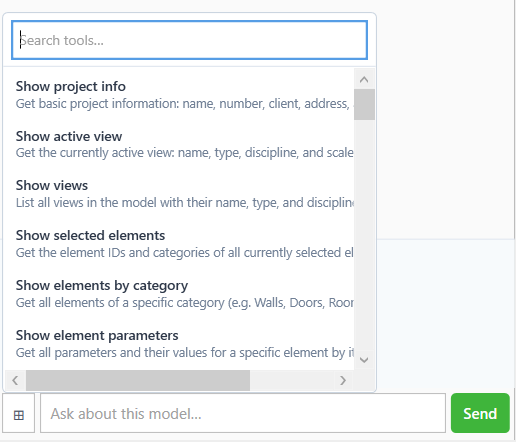
Search the list of know interactions.
Step 2 — Configure Claude Desktop
Make sure Claude Desktop is selected in the AI client toggle, then click Configure.
BonusTools will merge the server entry into Claude Desktop's configuration file at %APPDATA%\Claude\claude_desktop_config.json. If you have other MCP servers configured, they are preserved. Claude Desktop will appear in the Configured list once done.
A confirmation dialog will show the config file path. Note it — you will need to restart Claude Desktop in the next step.
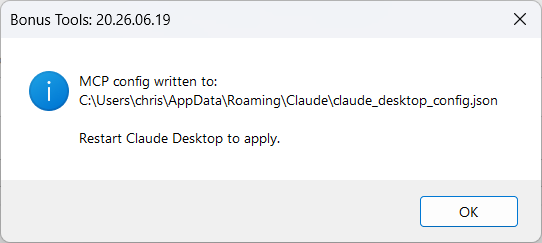
Step 3 — Restart Claude Desktop
Quit Claude Desktop completely (right-click the tray icon → Quit) and relaunch it. Claude Desktop reads the MCP config once at startup.
Step 4 — Open Revit with a project
The connector only works when Revit has a project open. Open any Revit project. The named pipe listener starts automatically when BonusTools loads, and activates fully once a project is open.
Step 5 — Verify the connection
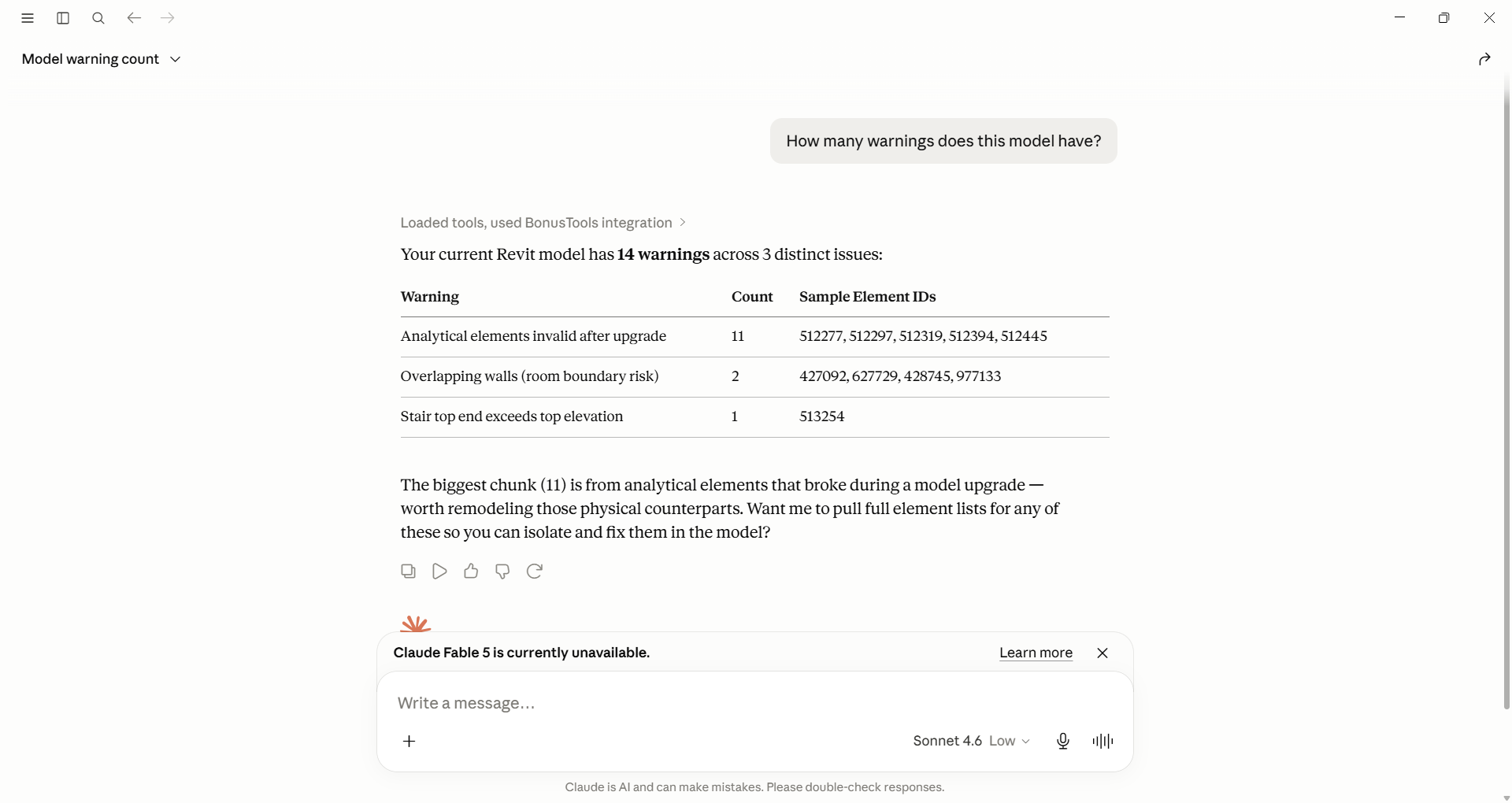
In Claude Desktop, open a new conversation and ask something Revit-related:
"How many warnings does this model have?"
The first interaction
The first time you ask claude a question you will be asked "Claude wants to use Get warnings summary from BonusTools" select Always allow, Allow Once or Deny as you desired.
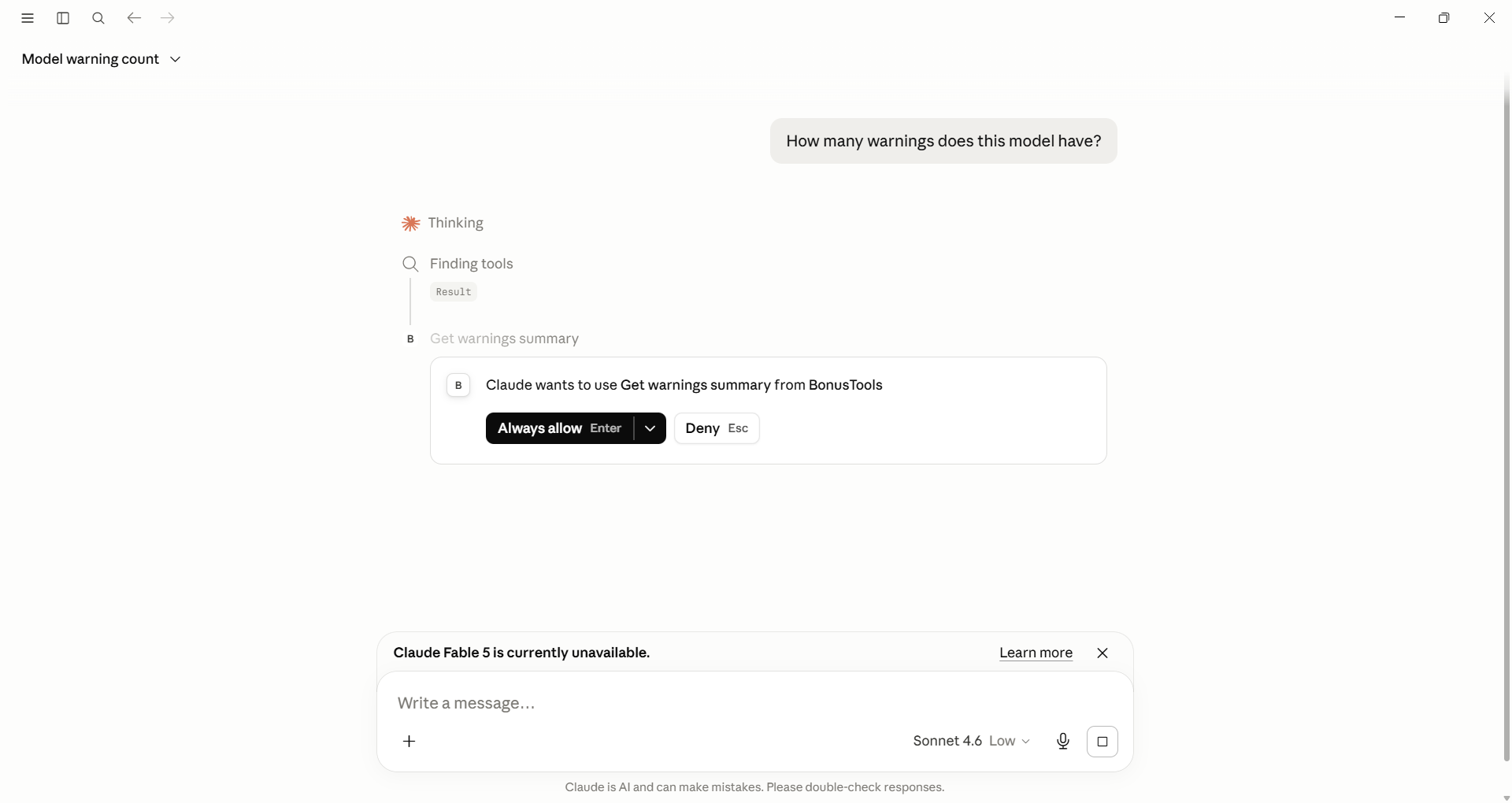
If the connection is working, Claude will fetch live data from Revit and respond with real results from your open model. You will see a brief "searching" or tool-use step before the answer appears — that is Claude calling BonusTools behind the scenes.
Ask Claude about the model. Hello Samuel Macalister...
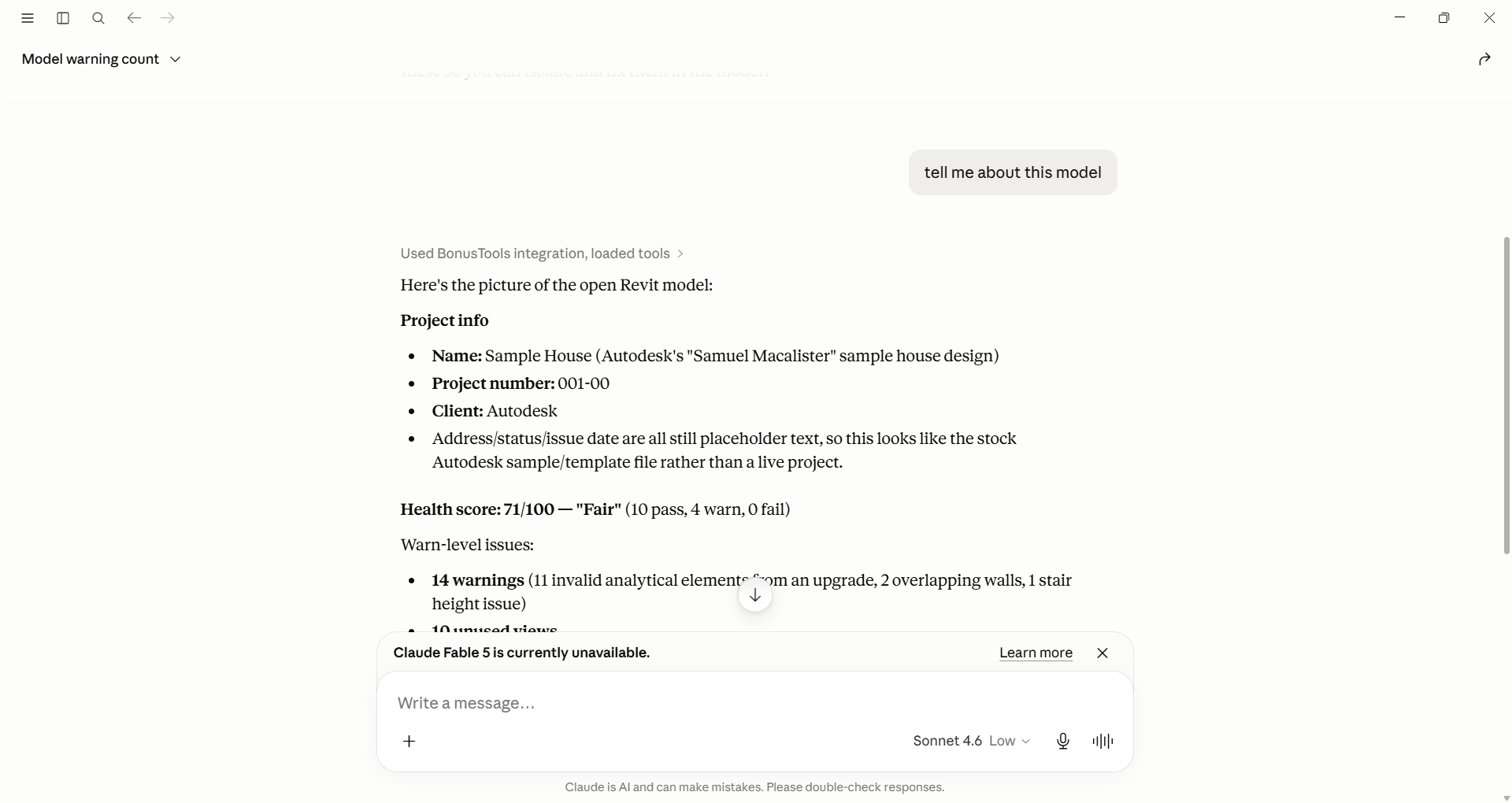
If Claude responds with something generic rather than real model data, the connection is not active — check the troubleshooting section below.
Revit must stay open. If you close Revit or close the project, the connector will return a "Revit not ready — open a project first" message until you reopen a project. You do not need to restart Claude Desktop.
Revit must not be busy I have found if Revit is doing something then Claude my time out.
Setup: Cursor
Cursor is configured the same way as Claude Desktop — one click from BonusTools Settings.
1. Open BonusTools Settings
In Revit, open Settings from the BonusTools ribbon and go to the AI Assistant tab. Scroll to the MCP Server section.
2. Configure Cursor
Select Cursor in the AI client toggle, then click Configure.
BonusTools will merge the server entry into %USERPROFILE%\.cursor\mcp.json. If the file does not exist it will be created. Cursor will appear in the Configured list once done.
3. Restart Cursor
Cursor picks up MCP config changes on restart. After restarting, BonusTools Revit tools will appear in the Cursor agent tool list.
What it can do
All 50 tools are available in both the embedded panel and the Claude Desktop/Cursor connector. You can ask questions in plain English — the AI will figure out which tools to call.
| Capability | Example prompt |
|---|---|
| Project info | "What is the project name and client?" |
| Site & coordinates | "Where is this project located?" |
| Active view | "What view am I currently in?" |
| Views & templates | "What floor plan views are in this model?" / "List all view templates" |
| Sheets & schedules | "List all sheets in the A- drawing set" / "What schedules exist?" |
| Levels & grids | "What levels are defined?" / "List all grids" |
| Phases & design options | "What phases does this project have?" |
| Elements by category | "How many walls are in the model?" |
| Search elements | "Find all doors with fire rating EI60" |
| Elements in view | "What elements are in the current view?" |
| Element parameters | "What are the parameters on element 123456?" |
| Write a parameter | "Set the Comments parameter on element 123456 to 'Reviewed'" |
| Selected elements | "What have I got selected?" |
| Rooms | "List all rooms on Level 1 with their areas" |
| Unenclosed / unplaced rooms | "Are there any rooms that aren't enclosed?" |
| Warnings | "What are the most common warnings in this model?" |
| Model health summary | "Give me a health check on this model" |
| Families & in-place families | "What families are loaded?" / "Are there any in-place families?" |
| Worksets | "What worksets are in this model?" |
| Linked Revit & CAD | "What Revit links are loaded?" / "Any imported CAD in the model?" |
| Shared parameters | "List all shared parameters used in this project" |
| Pinned elements | "What elements are pinned?" |
| Reference planes | "List all named reference planes" |
| Duplicate marks | "Are there any duplicate door marks or room numbers?" |
| Unused views | "Which views have never been placed on a sheet?" |
| Views with 'copy' in name | "Find any views that look like accidental duplicates" |
| Navigate to a view | "Open the Level 2 floor plan" |
| Select elements | "Select all the doors on Level 3" |
| Isolate elements in view | "Isolate all structural columns in the current view" |
| Reset view isolation | "Reset the isolation in this view" |
The assistant can chain multiple tool calls together — for example, finding all unenclosed rooms, then selecting them, then isolating them in the current view.
What it cannot do
The AI Assistant cannot:
- Create or delete elements — no geometry changes
- Modify elements beyond parameter values — it can write individual parameters but cannot move, resize, or reshape elements
- Work in Family documents — project documents only
- Access linked models — only the host model is visible
- Print or export — use the dedicated BonusTools print/export tools
- Access the internet — it sends your question and model data to Anthropic's API, but cannot browse external sites
Tips
- Be specific with view names. When asking to open a view, use the exact name as it appears in the Project Browser.
- Ask follow-up questions. The assistant remembers the conversation, so you can ask "now select just the ones on Level 2" after a previous query.
- Use "Clear" to reset (embedded panel). The Clear button wipes the conversation history and starts fresh — useful when switching to a new task.
- Large models. Queries that return many elements are limited to 200 results per category to keep responses fast.
- Claude Desktop is better for complex queries. Claude Desktop has a larger context window and can handle longer, multi-step analysis more reliably than the embedded panel.
- Both modes at once. You can use the embedded panel and Claude Desktop simultaneously — they share the same Revit connection and the same 50 tools.
Troubleshooting
Panel shows "API Key Required" Open Settings via the button in the panel, go to the AI Assistant tab, and enter your Anthropic API key.
"Error: API key invalid"
Double-check the key in Settings — ensure there are no leading/trailing spaces. Keys start with sk-ant-.
No response / times out (embedded panel)
Check your internet connection. The assistant requires outbound HTTPS access to api.anthropic.com.
Revit crashed when opening a view This was a known issue in early builds, fixed in the current release. If it recurs, navigate to the view manually rather than via the assistant.
Claude Desktop responds generically instead of with real Revit data
- Open BonusTools Settings → AI Assistant tab → MCP Server. Claude Desktop should appear in the Configured list. If not, select Claude Desktop and click Configure.
- Make sure you fully quit and restarted Claude Desktop after configuring.
- Open Revit and load a project — the connector only activates with a project open.
Claude Desktop shows "Revit not ready — open a project first" Revit is running but no project is open. Open any Revit project and retry your query.
Claude Desktop shows "Could not connect to Revit" Revit is not running or BonusTools failed to load. Start Revit, open a project, and check the BonusTools ribbon is visible. Then retry.
Cursor shows no BonusTools tools
Check that %USERPROFILE%\.cursor\mcp.json exists and contains the correct BonusToolsMcpServer.exe path. Restart Cursor after editing the file.
"Pipe server not running" in Settings This should not normally occur if Revit loaded BonusTools correctly. Try closing and reopening Revit. If the problem persists, check the Revit journal file for BonusTools startup errors.