
003 Common Tool Controls
Chris McKeown / January 13, 2026
General
Bonus Tools are designed with a consistent interface so that each tool feels familiar and easy to use. Many controls are common across tools, providing a predictable workflow.
Top Left Menu

The top-left menu typically includes buttons to filter the elements displayed. Options include:
- Current View – show elements visible in the current view.
- Current Selection – show only currently selected elements.
- Entire Project – show all elements in the project.
Top Right Menu
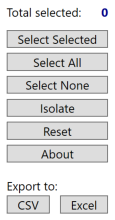
The top-right menu provides tools for selecting elements, accessing help, and exporting data.
Selection Options
You can choose elements to work with using:
- Checkboxes – select elements individually.
- Mouse + Ctrl/Shift – highlight multiple rows and click Select Selected.
- Select All – select every element in the grid.
- Select None – clear the current selection.
- Isolate – hide all unselected elements in the grid.
- Reset – clear selections and start over.
The top-left counter updates in real time to show the number of selected elements.
Some grids also support sorting and filtering by column headers similar to excel.
About
Click About or press F1 to view help for the current tool.
Export
Most grids can be exported to Excel or CSV for further analysis.
Bottom Right Menu
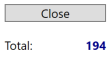
The bottom-right menu generally includes:
- Close – exit the current tool.
- Total Elements – display the total number of elements in the grid.