Bonus Tools for Revit 2027 — The Biggest Release Yet
Chris McKeown / June 18, 2026
Release, Revit 2027, New Tools
~1 min read3 words
0 views
Revit 2027 — Now Available
Stop doing Revit's repetitive work by hand.
158 automation tools for Autodesk Revit — now with Revit 2027 support, a
complete UI overhaul, 10 languages, a brand-new Hatch Pattern Creator, and a
Claude-powered AI assistant embedded directly inside Revit.
A dedicated ribbon inside Autodesk Revit with 158 automation tools. One license
covers Revit 2019 through 2027 — your whole team, every version.
The goal is simple: eliminate the hours of repetitive clicking that every project
produces.
Sheets & Views
Create, rename, duplicate and manage sheets at scale
Families & Parameters
Bulk-edit, purge, and audit families and shared parameters
Excel Integration
Import and export schedules, parameters, and data to Excel
Quality Control
Audit warnings, check model health, and enforce standards
Worksets & Linking
Manage linked files, worksets, and reload paths in bulk
Standards & Compliance
Enforce naming conventions, keynotes, and BIM standards
New in 2027
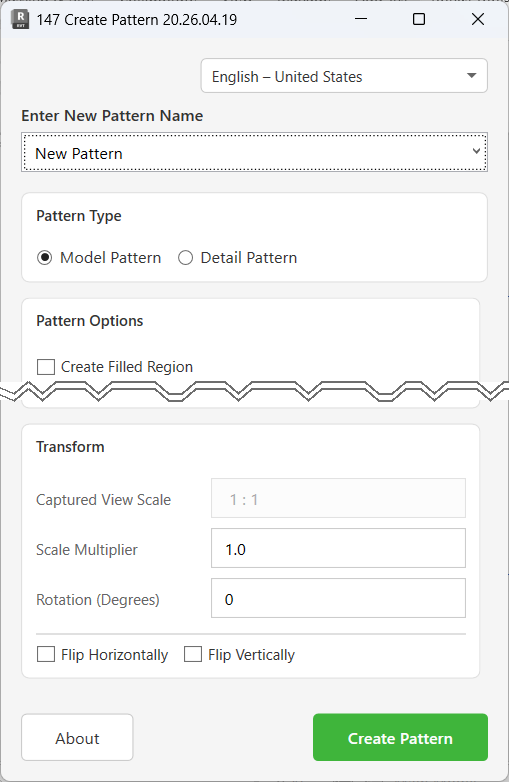
Hatch Pattern Creator
Stop hand-coding .PAT files. Draw your pattern in Revit using native line
tools, pick the boundary, and Bonus Tools converts it into a reusable fill
pattern — Model or Detail, with scale, rotation, and flip transforms. Export
to .PAT for AutoCAD or other projects. If you've debugged a .PAT file
before, this will save you hours.
Everything else that changed
✓
Complete UI refresh — all 158 tools
Every dialog rebuilt to a consistent standard. The suite now looks like a
single product, not 158 separate ones.
✓
Help documentation — every tool
Step-by-step guides, field references, and troubleshooting for all 158
tools. Accessible from within each tool — no searching required.
✓
10 languages
English, German, French, Spanish, Italian, Japanese, Korean, Polish,
Simplified Chinese, Brazilian Portuguese — matching Revit's own language
list.
✓
Tool 13 — Dimensions List
Linked file dimensions now visible. Excel-style column filtering added.
✓
Tool 91 — Advanced Sheet Duplication
Dependent Views now replicate correctly when duplicating sheets.
✓
Bug fixes — Tools 34 & 38
Shared Parameters dialog fixed for Revit 2019–2023. View Renamer now fires
correctly on View Duplication.
In Practice
What it actually looks like
Without Bonus Tools
Project number changes. You open each sheet, edit the number, close the
dialog — and repeat 80 times. It takes 45 minutes and you'll make at least
one typo.
→
With Bonus Tools
Open Sheet Renamer. Type the old prefix, type the new one, click Apply.
Every sheet updated in under 10 seconds — zero typos.
That's one tool. There are 157 more just like it — each one built for a specific
Revit frustration. Most users discover about 10 of them. We're going to fix that.
Coming up
158 tools. Most Revit users know about 10.
Over the coming weeks we'll be introducing each tool individually — why it was
built, what it does, how to use it, and exactly how much time it saves. One tool,
one email, one workflow problem solved.
The problem
The specific Revit frustration the tool was built to eliminate
How to use it
Step-by-step so you can use it the same day you read this
Time saved
A real estimate of how many minutes or hours it saves per project
New in 2027 — Tool 158
An AI assistant embedded inside Revit
Ask questions about your open model in plain English. A dockable panel inside
Revit, powered by Claude, with direct live access to your model data.
Every other Revit AI tool on the market requires Claude Desktop installed
separately before it works. Tool 158 is embedded —
no separate apps, no Claude Desktop.
Add your API key, reach out to enable the feature, and it's ready inside Revit.
An API key is required because running a capable AI model has a real per-query
cost — Anthropic charges based on usage. Rather than estimate your usage and bake
it into the BonusTools price, we pass the cost straight through so you pay only
for what you actually use, directly to Anthropic.
It reads warnings, families, sheets, worksets, rooms, and more. Run a model health
check and get a scored report in seconds. And critically — it can find and
launch any of the 157 BonusTools commands
on your behalf. No competitor can offer that.
Biggest issue: 47 unused views. Want me to launch
Tool 19 — Remove Unused Views?
A note from Chris
Bonus Tools started as tools I built to survive my own Revit projects. Over time,
others started using them and the suite grew to what it is today. This release is
the one I've wanted to ship for a long time — a solid foundation with everything
in order.
If you haven't used Bonus Tools before — or it's been a while — there's never been
a better time to try it.
Chris McKeown
Founder, BonusTools
Ready to upgrade?
Your existing license works on all Revit versions. Download, install, done.